Letterbench › Templates › Email verification template
Email verification template
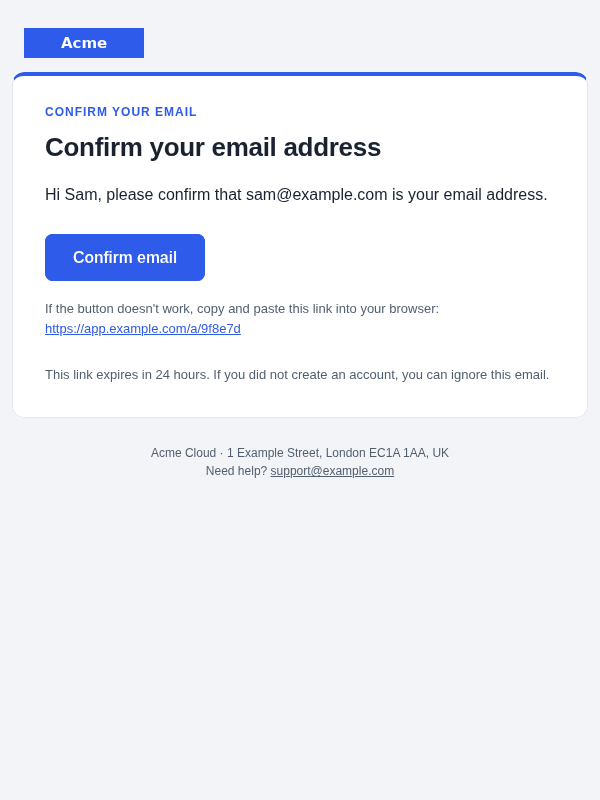
Confirm-your-address email with a button, a plain fallback link and an expiry time.
AccountFree (MIT)
Subject and preheader
| Subject | Confirm your email address |
|---|---|
| Preheader | Confirm your email to activate your {{product_name}} account. |
Variables
{{action_url}} {{company_address}} {{expiry_hours}} {{logo_url}} {{product_name}} {{support_email}} {{user_email}} {{user_first_name}}
Handlebars names; the React Email edition uses the same names in camelCase as typed props.
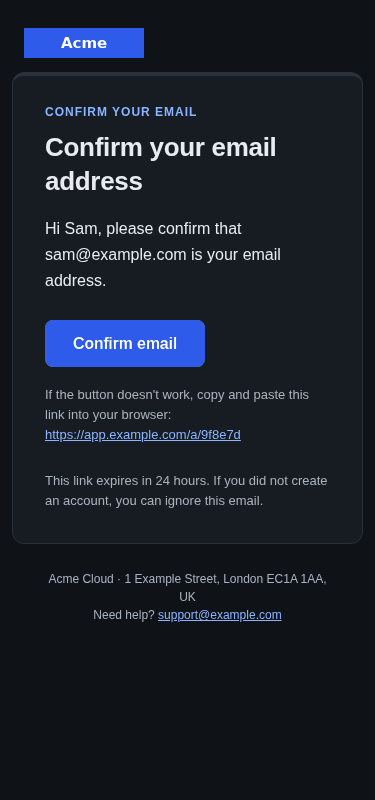
Mobile, dark mode
Plain-text version (included)
Confirm your email address

CONFIRM YOUR EMAIL
Confirm your email address

Hi {{user_first_name}}, please confirm that {{user_email}} is your email
address.

Confirm email: {{action_url}}

This link expires in {{expiry_hours}} hours. If you did not create an account,
you can ignore this email.

--
{{product_name}} · {{company_address}}
Need help? {{support_email}}
React Email version (TSX)
// verify-email: Account. Generated by react/generate.js from templates.js.
import * as React from 'react';
import { Layout, Eyebrow, H1, P, CTA, FallbackLink, Note } from './components/ui';

export interface VerifyEmailEmailProps {
  actionUrl: string;
  companyAddress: string;
  expiryHours: string;
  logoUrl: string;
  productName: string;
  supportEmail: string;
  userEmail: string;
  userFirstName: string;
}

export const subject = () => "Confirm your email address";

export default function VerifyEmailEmail(props: VerifyEmailEmailProps) {
  const { actionUrl, companyAddress, expiryHours, logoUrl, productName, supportEmail, userEmail, userFirstName } = props;
  return (
    <Layout title={`Confirm your email address`} preview={`Confirm your email to activate your ${productName} account.`} productName={productName} logoUrl={logoUrl} companyAddress={companyAddress} supportEmail={supportEmail}>
      <Eyebrow>Confirm your email</Eyebrow>
      <H1>Confirm your email address</H1>
      <P>Hi {userFirstName}, please confirm that {userEmail} is your email address.</P>
      <CTA href={actionUrl}>Confirm email</CTA>
      <FallbackLink href={actionUrl} />
      <Note>This link expires in {expiryHours} hours. If you did not create an account, you can ignore this email.</Note>
    </Layout>
  );
}

/** Plain-text version: send it alongside the HTML (e.g. Resend/Postmark `text`). */
export function text(props: VerifyEmailEmailProps): string {
  const { actionUrl, companyAddress, expiryHours, logoUrl, productName, supportEmail, userEmail, userFirstName } = props;
  return [
    `Confirm your email address`,
    '',
    `CONFIRM YOUR EMAIL`,
    `Confirm your email address`,
    '',
    `Hi ${userFirstName}, please confirm that ${userEmail} is your email address.`,
    '',
    `Confirm email: ${actionUrl}`,
    '',
    `This link expires in ${expiryHours} hours. If you did not create an account, you can ignore this email.`,
    '',
    '--',
    `${productName} · ${companyAddress}`,
    `Need help? ${supportEmail}`,
  ].join('\n').replace(/\n{3,}/g, '\n\n') + '\n';
}

VerifyEmailEmail.PreviewProps = {
  "actionUrl": "https://app.example.com/a/9f8e7d",
  "companyAddress": "1 Example Street, London EC1A 1AA, UK",
  "expiryHours": "24",
  "logoUrl": "https://placehold.co/240x60/2F5BEA/FFFFFF/png?text=Acme",
  "productName": "Acme Cloud",
  "supportEmail": "support@example.com",
  "userEmail": "sam@example.com",
  "userFirstName": "Sam"
} satisfies VerifyEmailEmailProps;
This template is in Letterbench Lite, free under the MIT licence, in both editions.
Tested
Size under Gmail's 102 KB clip limit, alt text, lang, preheader, links, every variable resolved, no 375px overflow, WCAG AA contrast in light and dark mode. Rendered in headless Chrome; not tested in Outlook desktop, the Gmail apps or Apple Mail.
← Welcome email template · All templates · Magic link sign-in email template →